So, you’re about to start a blog post. You’ve come to the right place! If you’ve never written a blog post before, it takes a little bit of time to develop your own process. To help you get started (and to refer to in the future), here is what helps me when I sit down to write. I’ll be covering three main areas and listing some additional resources at the end!

the process
This looks different for everyone, but you’re definitely going to want to have a plan in place for writing your blog post. For me, it looks a little bit like this:
Do the reading(s)
Each post you write will be guided by the readings due that day. This is not to say that you should be writing about the exact same things you read, but it is mostly to find a specific nugget of information that you can apply to a topic of your interest. When I find that bit that I want to write about, it usually feels like a light bulb going off in my brain. Find something that clicks for you!
Brainstorm a topic
Maybe you have a specific theme to your blog, like you mostly write about music or the current political situation. No matter what you write about, finding an idea for the blog post and applying the nugget you drew from the reading is often the most challenging part.
Something that helps me is thinking about what you like to talk/write about and keeping a running list of those topics. Maybe it won’t work for the blog post due next week, but maybe you might find that an idea you had works best with a unit later in the semester.
I knew from the beginning of the semester that I wanted to write a blog post about my favorite Black Mirror episode, Striking Vipers. I kept it in the back of my mind and was able to write about it for one of the final blog posts—it’s my favorite post that I’ve written!
outline, outline, outline
Again, your outline process may differ from that of your classmate’s, but it’s important to map out your blog post so that you’re hitting all of the points you want to make in a way that flows properly. I’m a big outline person (I’m looking at an outline for this post as I’m writing this). I would often have two Word documents open to have my detailed outline in one and write my actual post in the other. My more successful blog posts had outlines that looked like this:
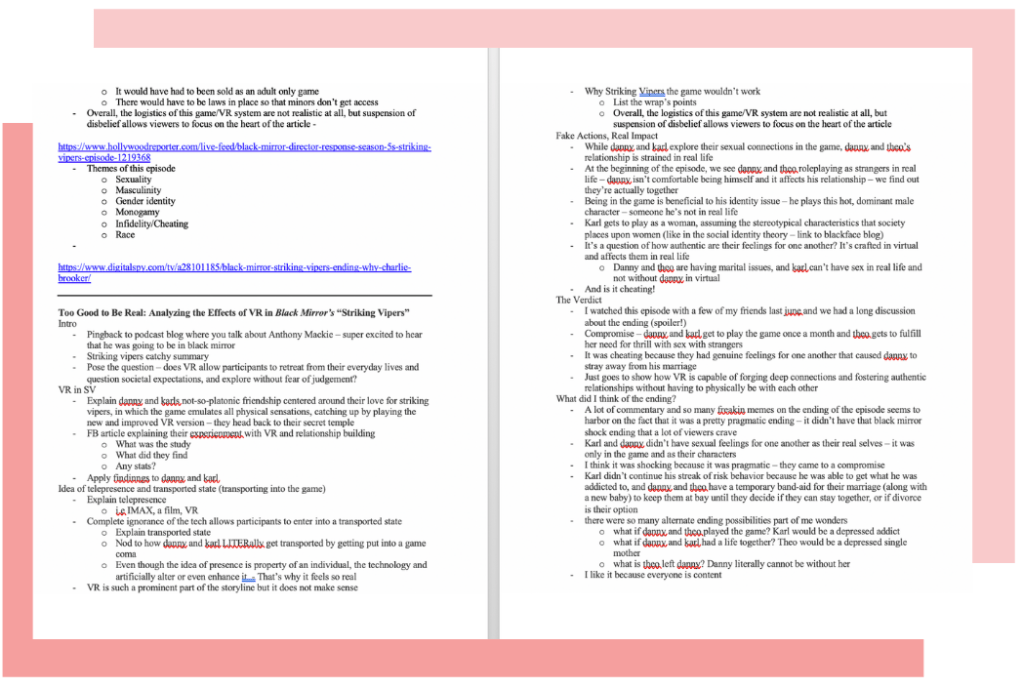
The more detailed my outlines were, the easier (and quicker!) it was for me to synthesize my blog post because I knew what I wanted to talk about and in what order. It also helps keep track of photos and other media you want to embed when you bring your post onto WordPress.
writing & editing
The most daunting part of the process is actually getting out what you’re trying to say. I would say do your best to just get words out on a page before doing any major editing – you can’t edit if there aren’t any words on the page!

Follow your outline, read your post aloud to catch errors/inconsistencies afterwards, and you should be good to go!
overall format
Your post should be easy to read grammatically but also visually.
People are very impatient when it comes to reading online, so you don’t want to make it any harder for them. The biggest thing to keep in mind is that you have to give the eye chances to breathe. Having more paragraph breaks for your different points allows them to jump around and find what’s important. You never want to have huge paragraphs in your blog post – this one is already getting too long for my liking…
Ways that you can make the reading experience more enjoyable:
- Headings! These are crucial. You want them to be relevant/specific to the following body paragraph. This takes a bit of learning.
- Smaller chunks of text.
- Use (relevant!) images to break up longer ideas.
- Embed outside content like Tweets or YouTube videos.
- Bullet lists (see what I did there?)
citing your sources
We all know how important it is to give credit where credit is due. All of your posts will be informed by the class readings and other online sources (articles, images, etc.) that you need to cite. But citing sources in a blog post looks a lot different than doing so in an academic paper. Hyperlinks are the way to go.
Here is an example of a proper way to cite an article:
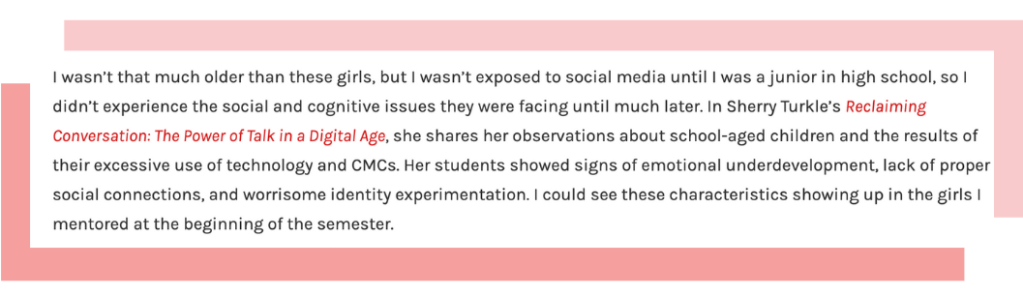
The words that are in a different color contain links to my sources. Oftentimes, you’ll be referencing an article that was given to you as a scanned PDF—in that case, try to find the Amazon link to the book or the author’s website so that way they are still getting credit for their ideas.
It’s as easy as command + K and pasting a link! And there’s no need to have a bibliography—just let your links do the talking.
curating content made by you
A lot of blogging is about finding your voice—what does that even mean, right?
For example, I sort of describe my blogging voice as casual, but clear and informative. That’s a good place to be. You want to write about things that make you excited, but don’t try and be something you’re not. Like, you will never see me writing about sports…
It takes a few posts to get the hang of it, so try not to get frustrated. Blogging is a lot different than the academic writing that you’re used to and takes a bit of unlearning. You’ll get the hang of it in no time.
The most important thing is that you’re connecting the readings and you’re creating a good flow of your thoughts. Each subsection of your blog post should follow the previous one in a way that makes sense. Too much jumping around makes our post feel unorganized.
Lastly, make sure you’re completing your thoughts. I believe the recommended word count for each post is about 500 words, but that is not a ton of room to introduce topics and expand on them in a way that is productive. Keep writing until each point is well-explained and you’ll have a much more sophisticated blog post.
this is supposed to be a fun learning experience
I cannot stress this enough—write about things that make you excited to know more. The best part about media courses is taking what you learned and recognizing the concepts in the media you consume. If that happens, write about it! You’ll have so much fun and end up with a handful of awesome posts that prove you know how to blog and apply dense theoretical concepts to real life.
And it’s much better if you experience it together. Try to read a new classmate’s blog post every week and see what others are writing about. You can learn so much from each other and support one another in this course. I know I enjoyed seeing how others applied the readings to things they care about.
resources
Here are somethings that I found useful for blogging for a number of reasons:
- Canva
- Want to create a quick graphic to add to your blog post but you aren’t a graphic designer? Canva is a super easy tool to use (Dr. Flynn approved)!
- Coolors.co
- This is for my pals who enjoy having a consistent color palette. Create your own palette or have coolors auto-generate one for you and then export them for your personal use.
- Giphy.com
- Looking for an infinite library of moveable images? Take them right from here—just be sure to link back to the source.
- Pomodoro Timer
- This timer saved my life during finals. It helps you do focused work in intervals with short breaks in between, so you can get that work done. Use this if you’re struggling to just sit down and write the damn blog post. You’re. Welcome.
That’s all I‘ve got for now! If you’re in need of some one-on-one assistance to help get you on track, be sure to set up a tutoring appointment with me and we can work through it together!


Leave a Reply